Code Apps started without one essential member of Power Platform - Power Automate. HTTP trigger was a workaround, but native flow support is here in Preview, so it is time to check it out.
To test it we need:
- Code App
- Power Automate flow with Power Apps trigger. It must be solution-aware, which is great, we don’t need to add orphaned flows to the list of everyday problems
- @microsoft/power-apps (v1.1.1 or higher)
Add flow to the app - what’s generated
Prepared a flow with mixed param types:
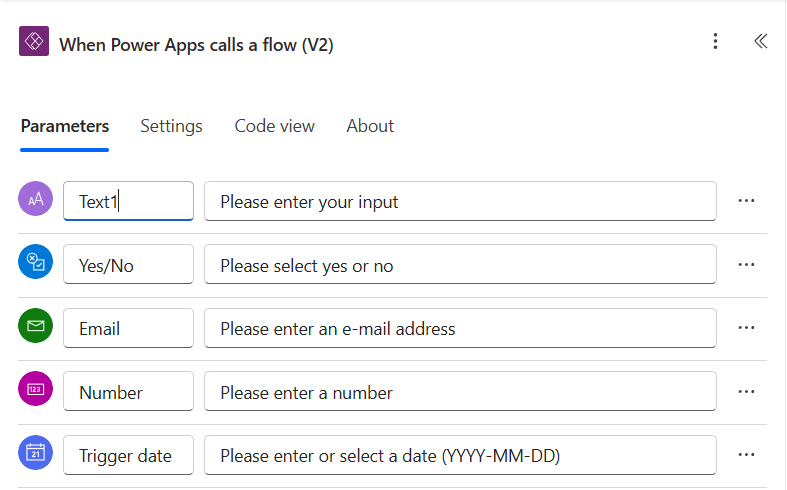
To work with flows, we can forget about pac, npm-based CLI npx power-apps is our friend.
npx power-apps list-flowswill list flows inside solutions.
  Cloud Flows
--------------------------------------------------------------------------------
  Name                                     Status   Modified On           Flow ID
--------------------------------------------------------------------------------
  ...
  Beautiful Flow With Unlimited Potential  Active   5/2/2026, 7:01:45 PM  cccccccc-cccc-cccc-cccc-cccccccccccc
  ...
The Flow ID shown here is what add-flow expects.
Note that the ID in the flow’s URL is the workflowEntityId, not the Flow ID. During testing the command accepted the URL ID as well, but workflowDetails ended up with workflowEntityId and workflowName set to the same value:
      "workflowDetails": {
        "workflowEntityId": "qqqqqqqq-qqqq-qqqq-qqqq-qqqqqqqqqqqq",
        "workflowDisplayName": "Test Adding",
        "workflowName": "qqqqqqqq-qqqq-qqqq-qqqq-qqqqqqqqqqqq"
      }
It still generated model/service/etc. correctly and the flow ran fine, but the config looks confusing. Re-running with the correct Flow ID fixed the entry. So a radical thought: maybe worth talking to your team about this command behavior.
npx power-apps add-flowwill add/update flow in the code app project. With a new flow, it will generate model, service, schema, and add flow to thepower.config.json. If you run it on a flow that’s already added, all these files will be regenerated to reflect changes made to the flow, no dups created.
You need Maker permissions on the flows and connections to run this command.
npx power-apps add-flow --flow-id cccccccc-cccc-cccc-cccc-cccccccccccc
After the flow is added, new generated files appear:
Model:
export interface ManualTriggerInput {
  text: string;
  boolean: boolean;
  number?: number;
  // ...
}

export interface ResponseActionOutput {
  text?: string;
  yesno?: boolean;
  number?: number;
  // ...
}
And service:
export class BeautifulFlowWithUnlimitedPotentialService {
  private static readonly dataSourceName = 'beautifulflowwithunlimitedpotential';
  private static readonly client = getClient(dataSourcesInfo);

  public static async Run(input: ManualTriggerInput): Promise<IOperationResult<ResponseActionOutput>> {
    // ...
  }
}
Of course, power.config.json is updated with
  "connectionReferences": {
    "aaaaaaaa-aaaa-aaaa-aaaa-aaaaaaaaaaaa": {
      "id": "/providers/Microsoft.PowerApps/apis/shared_logicflows",
      "displayName": "Logic flows",
      "dataSources": [
        "beautifulflowwithunlimitedpotential"
      ],
      "workflowDetails": {
        "workflowEntityId": "bbbbbbbb-bbbb-bbbb-bbbb-bbbbbbbbbbbb",
        "workflowDisplayName": "Beautiful Flow With Unlimited Potential",
        "workflowName": "cccccccc-cccc-cccc-cccc-cccccccccccc",
        "dependencies": {
          "shared_teams-1": "dddddddd-dddd-dddd-dddd-dddddddddddd"
        }
      }
    },
    "dddddddd-dddd-dddd-dddd-dddddddddddd": {
      "id": "/providers/microsoft.powerapps/apis/shared_teams",
      "displayName": "Microsoft Teams"
    }
  }
and one more in .power\schemas\logicflows\BeautifulFlowWithUnlimitedPotential.Schema.json
{
  "name": "Beautiful Flow With Unlimited Potential",
  "id": "/providers/Microsoft.PowerApps/apis/shared_logicflows",
  "type": "Microsoft.PowerApps/apis",
  "properties": {
    "displayName": "Beautiful Flow With Unlimited Potential",
    "isCustom": false,
    // ...
  }
}
Call the flow
Okay, we checked what was done without us, so now it’s time to use it.
I kind of regret my flow name right now, will try to keep it low key next time
  const handleClick = async () => {
    const result = await BeautifulFlowWithUnlimitedPotentialService.Run({
      text: "text",
      boolean: true,
      email: "text@text.text",
      number: 16,
      date: "2000-11-11"
    });

    if (result.success) {
      console.log('Flow triggered. Response:', result.data);
    } else {
      console.error('Flow failed:', result.error);
    }
  };
In case you are lucky to have a flow without parameters:
const result = await FlowWithoutInputService.Run({});
Note: docs show Run() without arguments, but the generated service expects ManualTriggerInput, which is typed as object, so you need to pass {}.
If you’re migrating a Canvas app to a Code App, now you can reuse flows without too much hassle. And no need to overcomplicate your codebase with something that can be handled by Power Automate.